Disclaimer: This post contains affiliate links. We may earn a commission from purchases made through the links below, at no extra cost to you.
Introduction: Stop Looking Like a Pixelated Ghost
In the era of remote work, your webcam is your face to the world. Relying on a grainy laptop camera makes you look unprofessional and disengaged.
The good news? You don’t need a DSLR to look great on Zoom. We’ve tested the top-rated dedicated webcams that offer 1080p resolution, autofocus, and low-light correction. These upgrades will instantly make your video feed look sharp, bright, and professional.
1. Quick Summary: Top 3 Webcams for WFH
| Pick | Product Name | Key Feature | Price Range |
| 🥇 Best Overall | Logitech C920x HD Pro | The Industry Standard for Quality | Check Price |
| 🥈 Best 4K Value | Depstech 4K Webcam (DW49) | Incredible Resolution for the Price | Check Price |
| 🥉 Best Budget | NexiGo N60 1080p Webcam | Includes Privacy Cover & Wide Angle | Check Price |
2. 🥇 Our Top Pick: Logitech C920x HD Pro
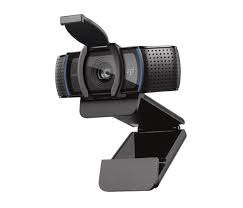
The Logitech C920x is the webcam that built the modern WFH world. It is the gold standard because it simply works—delivering crisp, balanced video in almost any lighting condition without needing complex software.
Why It Tops the List
- Automatic Light Correction: The RightLight 2 technology automatically adjusts to poor lighting, so you look clear even if your room is dim or backlit.
- Dual Stereo Mics: Built-in microphones capture natural audio, making it a great all-in-one solution if you don’t have a headset.
- Full HD Glass Lens: Unlike cheap plastic lenses, the glass lens delivers sharp, vibrant colors that look professional on any screen.
Watch the Video Review:
Final Verdict: If you want the most reliable, plug-and-play upgrade for professional meetings, the Logitech C920x is the unbeatable choice.
3. 🥈 Best 4K Value: Depstech 4K Webcam (DW49)
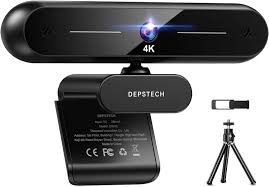
The Depstech 4K Webcam offers specs that usually cost $200+ for a fraction of the price. If you do presentations, record videos, or just want the sharpest possible image, this is the power user’s choice.
Key Features
- Stunning 4K Resolution: Delivers an incredibly sharp image (3840×2160) that captures every detail. Perfect for recording high-quality content or looking crystal clear on large monitors.
- Autofocus: Fast and accurate autofocus ensures you stay sharp even if you move around during a presentation.
- Privacy Cover & Tripod: Comes with a physical privacy shutter and a small tripod, offering flexible setup options right out of the box.
See the 4K Quality Test:
Final Verdict: For creators or professionals who demand the highest resolution without the premium price tag, the Depstech 4K is an incredible value.
4. 🥉 Best Budget Option: NexiGo N60 1080p Webcam
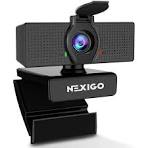
The NexiGo N60 proves you don’t need to spend much to look good. It takes the core features of expensive webcams—1080p video and a wide-angle lens—and packages them into an affordable unit.
Why This is the Top Budget Pick
- Wide-Angle View: The 110-degree field of view is perfect for showing a whiteboard or including multiple people in the frame.
- Built-in Privacy Cover: A simple slider physically blocks the lens when not in use, giving you total peace of mind.
- Plug and Play: No drivers needed. Just plug the USB into your laptop, select it in Zoom, and you’re ready to go.
Watch the Hands-On Review:
Final Verdict: The NexiGo N60 is the perfect entry-level upgrade that destroys your built-in laptop camera quality for the price of a takeout meal.
5. Buying Guide: What Matters for Video Calls?
Before you buy, check these three specs to ensure you get the right camera for your setup.
1. Resolution (1080p vs. 4K)
For Zoom and Teams, 1080p is the sweet spot. Most platforms compress your video anyway, so 4K is often overkill unless you are recording content for YouTube.
2. Low-Light Correction
This is critical. Unless you have a professional ring light, your room lighting will change. Look for cameras (like the Logitech C920x) that actively balance exposure so your face isn’t in shadow.
3. Field of View (FOV)
- 65-78 degrees: Best for solo calls (shows just your head and shoulders).
- 90+ degrees: Wide angle. Great for showing a room or whiteboard, but can make you look small if you sit far away.
6. Final Recommendation
For 95% of remote workers, the Logitech C920x is the perfect balance of price, performance, and reliability. It will serve you well for years.
Upgrade your video quality today: